A lot of the technology is pretty expensive for casual use, but the prices have come down drastically for some fairly decent quality stuff in recent years. It doesn’t hurt that Chinese manufacturers have taken tried and true designs for machines like 3D printers, copied them and cut enough corners to sell their wares at bargain-basement prices.
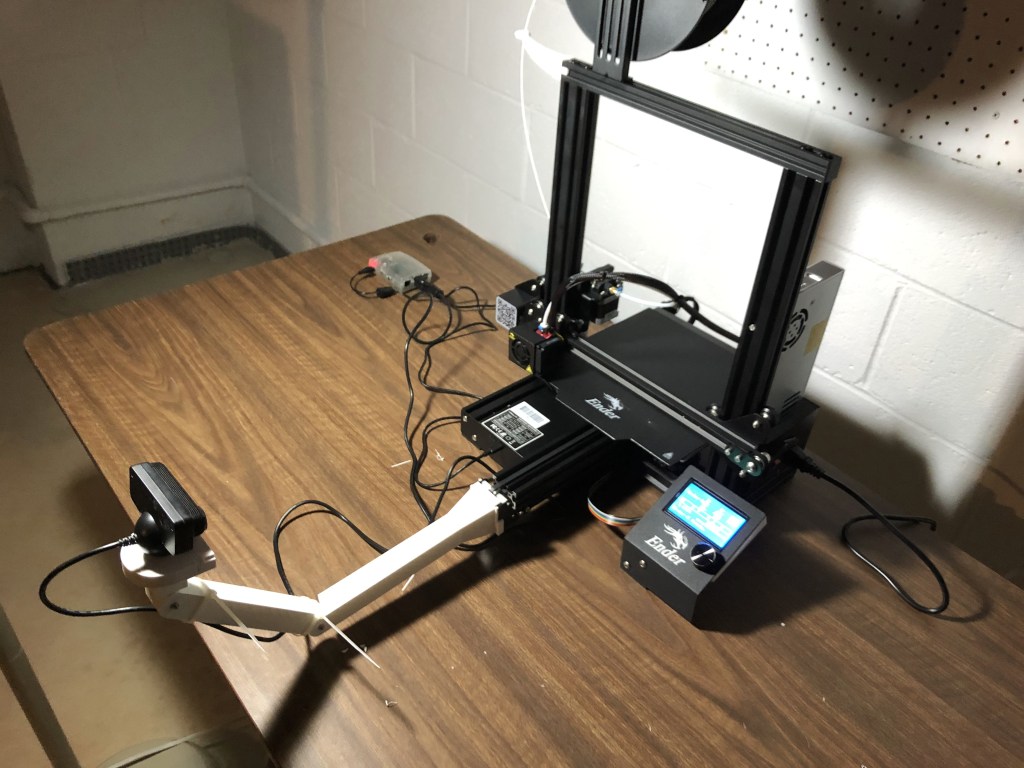
So I got a cheap 3D printer as something to play with. It turns out that 3D printing at the low-end is a tinkerer’s paradise. For example, the Creality Ender 3 Pro printer that I bought is fairly inexpensive (comparatively speaking – I bought mine for roughly $240US), and there is a thriving community of modders for it and other low-end devices. The software that runs the printer (Marlin Firmware) is open source and can be fiddled with ’til one’s heart’s content. There is plenty of free and low-cost software for creating and preparing 3D models for printing.
Slicers
The software that takes a 3D model and prepares it for printing on a particular printer is called a “slicer” because it literally figures out the slice-by-slice movements needed by a printer to build a physical 3D print from layers of extruded plastic or, in some cases, hardened UV light sensitive liquid resin (take a look at the video below for an example of how a 3D print happens). There are good examples of this software available at no or little cost, like Ultimaker’s Cura and PrusaSlicer. I am currently using a commercially available slicer called Simplify3D. It has a lot of nice features that can be helpful, but the free software works just as well in most cases.
Projects (what do you print, anyway?)
So, what do you do with a 3D printer, anyway? Well, you print, of course! Deciding what to print is in some cases the hardest part for me. I don’t want to print junk that will take up space and be a waste of plastic. Although that is not as big of an issue with the most popular type of plastic used in modern hobbyist 3D printers – PLA (poly lactic acid). PLA is synthesized from corn and can be composted with some effort. So far, PLA has met my needs.
Since the Ender 3 Pro is an open source printer design, there are plenty of user-designed add-ons and improvements readily available for it. All you need to do is download the design files, slice and print. Already-made 3D designs can be found on the Internet. Thingiverse is a good place to start looking for them.
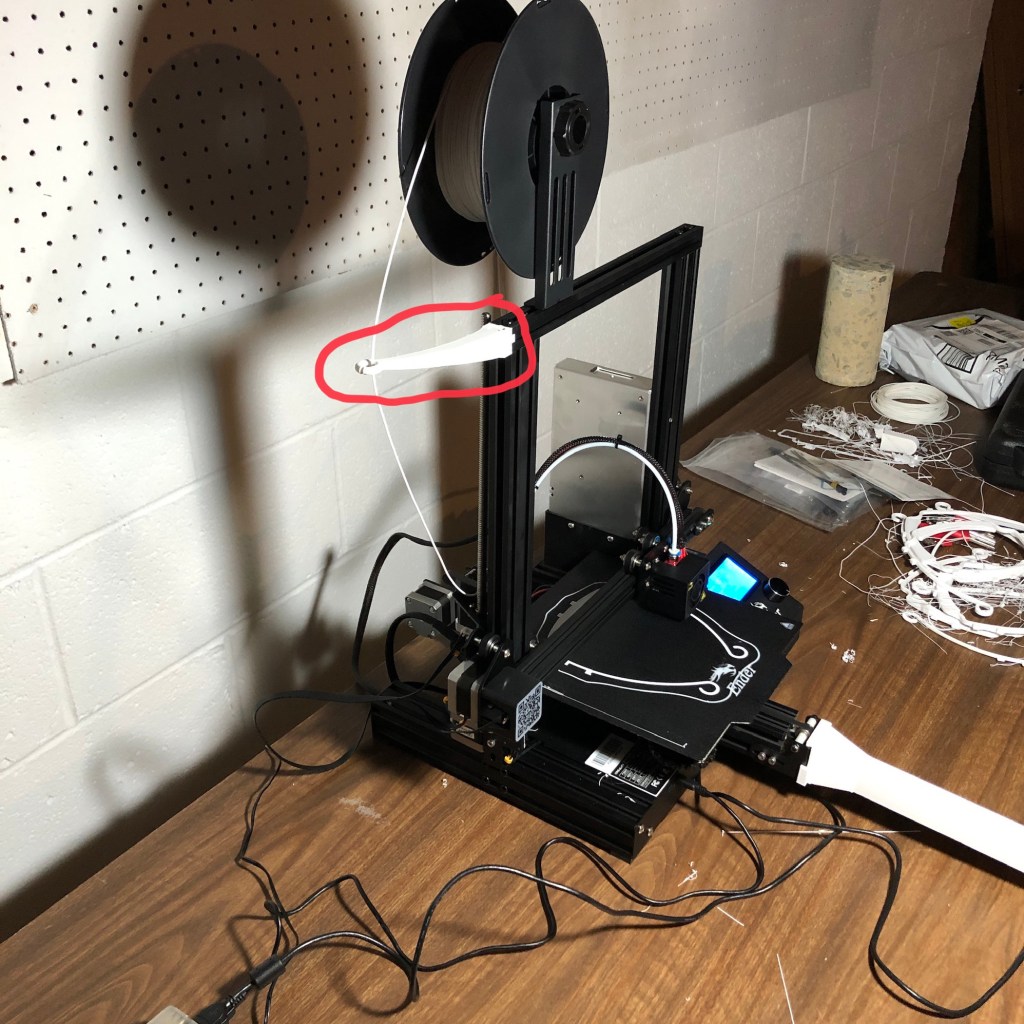
A good example of a freely available printer modification is the simple filament guide. The filament spool holder on my Ender 3 Pro sits atop the printer and the filament is fed through a tube by being pushed by a motorized gear toward the “hot end” at the end of the tube where the molten plastic is extruded in a controlled manner to build the printed object one layer (aka slice) at a time. Since the filament spool is directly above the feed mechanism, the filament is pulled from the spool and enters at a potentially acute angle which can cause extra friction in the feed mechanism. The filament guide holds the filament out and away from the feed mechanism allowing for a more direct entry for the filament in to the feed mechanism.
Make your own 3D designs
I have a webcam that I mounted on the printer. It is used for monitoring prints and also for creating time lapse videos of prints. The webcam really handy, and I had one lying around from an old Playstation 3. The webcam is connected to an amazing single board computer called the Raspberry Pi. The Raspberry Pi is running some software called Octoprint that I can use to control and monitor 3D prints from the comfort of… well, anywhere other than my basement where I have the 3D printer sitting. The Raspberry Pi and Octoprint are complicated enough for their own article, so I’ll leave those details for later.
I designed the mount for the webcam myself using some software for the Apple iPad called Shapr3D. It’s free to a limited extent, and there are alternatives that can be used for free, like Sketchup, Tinkercad and Fusion 360. Some of these run on your web browser. Some require that you install the software on your computer.

3D printing as a home resource
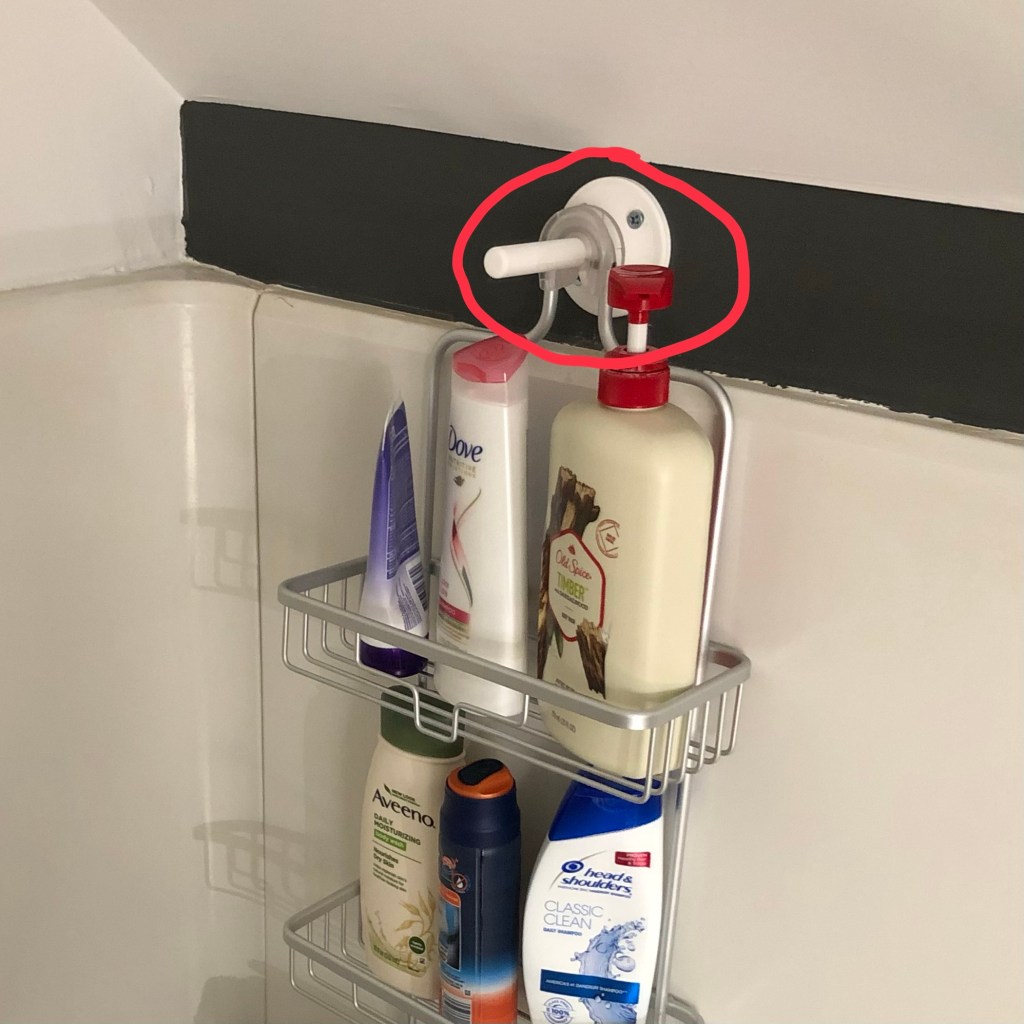
A 3D printer can have many uses in the home. Sometimes appropriate projects are staring you in the face. For example, in my home showers I wanted to hang up some caddies to hold shampoo bottles, etc., but my shower stalls have a shelf that sticks out toward the shower head stem and restricts how wide a caddie could be.
The opposite wall in the shower stall from the shower head doesn’t have the shelf, but it also didn’t have a shower head stem onto which to hang the caddie. So, why not make something onto which to hang the caddie? In Sharp3D on my iPad, I drew up a simple rod roughly the thickness of a shower head stem and added a flange with screw holes, and, ta-da!, a “shower nubbin” for hanging the caddie.
Another example of a 3D printed object with some use around the house is the simple hook that I printed for hanging up my extension cords in the garage. I designed a simple flattened hook shape with some screw holes and printed it. It works pretty well, and I’m surprised at how strong the plastic is considering how heavy some of the extension cord bundles are.

Helpful 3D printing and design resources
With 3D printing and design there is a lot to learn about. Luckily many people have already done most of what you will endeavor to do, so there are a lot of good resources available.
YouTube channels:
- 3D Printing Nerd (3D Printing)
- Autodesk Fusion 360 (3D Design)
- Blender Guru (3D Design)
- Chuck Hellebuyck’s Filament Friday (3D Printing)
- MAKE Magazine (General “maker” info)
- Makers Muse (3D Printing)
- Shapr3d (3D Design)
- SketchUp (3D Design)
- Teaching Tech (3D Printing)
Web sites:
- Creality (3D printers)
- Thingiverse (Ready-made 3D designs)
- Fusion 360 (3D design software)
- Tinkercad (3D design software)
- Shapr3d (3D design software)
- Sketchup (3D design software)
- Blender (3D design software)
- Cura (Slicing software)
- PrusaSlicer (Slicing software)
- Simplify3D (Slicing software)
- Sculpteo (3D model preparation)
- 3dprintingforbeginners.com (3D printing how-tos)
- allthat3d.com/how-to-3d-print/ (3D printing tutorial)
- all3dp.com/best-3d-printing-tutorial/ (3D printing tutorials)
Conclusion
In the several months that I’ve been printing things (both useful and frivolous) I’ve grown to appreciate that 3D printing is a technology that will be incorporated more and more into everyday life. Now it’s still a tinkerer’s paradise, but as the technology improves and becomes more accessible and easy-to-use, I can see it becoming as ubiquitous as, say, a sewing machine or a table saw for those who like to make things for themselves. So far, for me learning about 3D printing has been an adventure, and I don’t see it ending any time soon.
 Peter Schwenk's Place
Leave a reply to Demetrius Pinder Cancel reply